我们给企业做 AI 落地和私有化部署

AI 应用和算力,交给一个团队做

我们是 FDE 技术团队,做 AI 企业数字化转型。先拿一个业务场景做出效果,要放进自己机房,再把系统和算力搬过去。

试点 7–15 天出可试用版本。云上、本地都能部署,数据可以不出内网。

自动回复 Agent流程示意
  1. 1

    收到询盘

    新询盘:想问一款产品的报价……
  2. 2

    识别客户、产品和意图 AI

    客户
    对上客户档案
    产品
    对上产品资料
    意图
    询价
  3. 3

    起草回复 AI

    引用产品资料,知识库有版本记录
  4. 4

    人工审批 销售

    涉及报价,先审批再发
  5. 5

    跟进

    建一条跟进任务,写明谁负责、下一步做什么。
AI 处理人工确认可以部署在云上或内网
流程示意,按 CW 外贸项目的做法画的,不是真实数据。

Enterprise AI, built and deployed for you

AI apps and the compute behind them, from one team

We're a forward-deployed engineering team. We start with one real workflow and get it working. When you're ready to bring it in-house, we move the system and the GPUs into your own data center.

A usable pilot in 7–15 days. Cloud or on-prem, and your data can stay inside your network.

Auto-reply agentIllustration
  1. 1

    Inquiry comes in

    New inquiry: asking for a quote on a product…
  2. 2

    Identify customer, product and intent AI

    Customer
    Matched to CRM record
    Product
    Matched to product docs
    Intent
    Price inquiry
  3. 3

    Draft the reply AI

    Cites product docs; knowledge base is versioned
  4. 4

    Human approval Sales

    Contains pricing: approve before sending
  5. 5

    Follow up

    Creates a follow-up task with an owner and a next step.
AI handlesHuman confirmsRuns in the cloud or on your network
Process illustration based on our CW export-trade project. Not real data.

FDE 技术团队

我们是一支 FDE 技术团队,主要做 AI 企业数字化转型

FDE 的做法是让工程师贴着你们的业务干活:从一个真实流程做起,把 AI 做进日常工作,上线后接着维护。

主要做的事

AI 企业数字化转型

从一个业务场景做起,理清流程和资料,先跑通,再推到第二、第三个场景和更多岗位。

主要做的事

建企业知识库

把文档、制度、合同、工单整理到一处。每条回答标出处,知识库有版本记录,需要的话只放在你们内网。

主要做的事

开发 Agent

按你们的业务定制 Agent。比如 CW 外贸数字员工里的搜索客户、自动回复、外贸录单(搭建中)。涉及报价这类高风险操作,由人审批后才执行。

我们怎么做

  1. 01贴着业务

    工程师和业务人员一起看流程、数据和现有系统。第一步是 AI 企业方案落地咨询。

  2. 02从真实流程做起

    挑一个最值得做的场景,用你们的真实资料,7–15 天做出能演示、能试用的版本。

  3. 03边用边改

    业务人员上手试用,我们按反馈接着改,最后按事先定好的范围和标准验收。

  4. 04交付后接着管

    开权限、做培训。上线后还是同一个团队维护,应用、算力和运维不用找好几家。

能落地的方向

  • 企业知识库
  • Agent
  • 流程自动化
  • 语音
  • 视频生成
  • 数字人

都可以放在云上或你们机房,数据可以不出内网。视频生成和数字人吃算力,本地部署时能做到什么程度要看算力档位:一台 RTX 5090 八卡机上,视频只到演示级;量大要上多机集群或更高档的节点。

和另外两种做法比

对比项FDE 技术团队(我们)买现成 SaaS传统外包
从哪开始你们的一个真实业务流程产品已有的功能一份写好的需求文档
怎么做同一个团队边做边改,7–15 天出试用版自己配置、自己摸索按合同范围开发,改需求要走变更
数据放哪云上或你们机房,数据可以不出内网一般在厂商的云上看项目约定
上线之后同一个团队维护、接着改厂商统一升级验收后另签维护

需求很标准、现成产品已经够用时,直接买 SaaS 更省事。

Forward-deployed engineering

A forward-deployed engineering team for enterprise AI

Forward-deployed means our engineers work right inside your business: we start from a real process, build AI into everyday work, and keep maintaining it after launch.

What we do

AI transformation, one workflow at a time

We start with a single business process, sort out the steps and the documents behind it, get it running, then roll it out to the next process and more teams.

What we do

Enterprise knowledge bases

Docs, policies, contracts and tickets in one place. Every answer cites its source, the knowledge base is versioned, and it can live entirely inside your network.

What we do

Custom AI agents

Agents built around how your business actually works, like the lead search, auto-reply and order entry (in progress) agents in our CW export-trade project. High-risk actions such as quoting always wait for human approval.

How we work

  1. 01Embedded with your team

    Our engineers sit with your people and walk through the process, the data and the systems you already have. It starts with an AI implementation assessment.

  2. 02Start from a real workflow

    We pick the use case most worth doing and, using your real documents, have a version you can demo and try within 7–15 days.

  3. 03Iterate in use

    Your staff use it, we keep refining based on their feedback, and sign-off is against scope and criteria agreed up front.

  4. 04We stay after launch

    Access setup and training included. The same team maintains it after go-live, so apps, compute and ops aren't split across vendors.

What we can deliver

  • Knowledge bases
  • Agents
  • Workflow automation
  • Voice
  • Video generation
  • Digital humans

All of it can run in the cloud or in your data center, with data kept on your network. Video generation and digital humans are compute-hungry, so on-prem results depend on the hardware tier: a single 8× RTX 5090 server handles video at demo level only; production volume needs a multi-node cluster or higher-end nodes.

How this compares

CriteriaFDE team (us)Off-the-shelf SaaSTraditional outsourcing
Starting pointOne of your real business workflowsWhatever features the product hasA written requirements spec
How it's builtOne team builds and iterates; usable pilot in 7–15 daysYou configure it and figure it outBuilt to contract scope; changes go through change requests
Where data livesCloud or your data center; data can stay on your networkUsually the vendor's cloudDepends on the contract
After launchSame team maintains and keeps improving itVendor ships upgrades for everyoneSeparate maintenance contract after sign-off

If your needs are standard and an existing product already covers them, buying SaaS is simpler.

我们做的六件事

下面这些都由同一个团队负责。每一项写了适合什么情况、具体做什么。需要的话,数据和算力可以留在你们自己的机房。

业务助手

问答、资料检索、公文写作、行业助手。一个场景一个场景地上线,看结果验收。

适合:员工每天要查资料、回同类问题、写固定格式文稿的岗位

  • 回答用的是你们自己的产品资料、制度和文档,每条回答标出处
  • 起草回复、公文和跟进内容,对外发出前由人确认
  • 外贸项目里正在搭三个 Agent:搜索客户、自动回复、外贸录单

流程自动化

多步骤任务、审批流、对接业务系统。重复的活交给系统跑。

适合:一件事要经过几个人、几个系统才能办完的流程

  • 例:询盘进来,先识别客户、产品和意图,再起草回复,销售审批后发出,最后建一条跟进任务
  • 涉及报价这类高风险操作,一律先由人审批再执行

资料与知识

文档、制度、合同、工单放到一处。每个回答都标出处,审计时查得到。

适合:资料散在各人电脑和群里、新人上手慢、需要留痕审计的团队

  • 知识库有版本记录,资料更新后能查到哪一版在生效
  • 对话、知识库和业务流程可以跑在同一套本地环境里
  • 资料可以只放在你们内网,不传到外部

云与本地算力

用云端还是放本地,看效果、成本和合规要求来定。

适合:还没决定要不要买服务器,或者已有 GPU 想用起来

  • 云端按用量或按席位收费,开通就能试
  • 本地部署最低一档是一台 RTX 5090 八卡机,往上到 H100 / H200 节点
  • 主流开源和商用模型都能接,对内统一一个接口

机房私有化

单机 GPU、机房集群、纯内网离线都能交付,数据跟着算力留在你们机房。

适合:政企、金融、制造、医疗等数据敏感行业,以及等保、涉密环境

  • 三种形态:一台单机或一体机、机房 GPU 集群、断网的内网离线版
  • 离线版用安装包交付,模型、知识库和日志都留在内网
  • 文本、图文、视频分开部署,互相不抢显卡

交付与运维

账号权限、用量统计、安全审计和培训都包括。上线后我们接着改。

适合:上线后还要有人持续维护、接着调整的项目

  • 本地部署时,GPU 占用、调用量、失败率和响应时间都能看到
  • 上线时开权限、做培训,定好运营指标

Six things we do

One team owns all of it. Each card says who it's for and what we actually do. If needed, data and compute stay in your own data center.

Business assistants

Q&A, document search, report and letter drafting, industry-specific assistants. We ship one use case at a time and you sign off on results.

Best for: Roles that spend the day looking things up, answering the same questions, or writing templated documents

  • Answers come from your own product docs, policies and files, and every answer cites its source
  • Drafts replies, documents and follow-ups; a person confirms before anything goes out
  • In our export-trade project we're building three agents: lead search, auto-reply and order entry

Workflow automation

Multi-step tasks, approval chains, integrations with your business systems. Repetitive work runs on its own.

Best for: Processes that pass through several people and several systems before they're done

  • Example: an inquiry arrives, the system identifies the customer, product and intent, drafts a reply, sales approves it, and a follow-up task is created
  • High-risk actions such as quoting always need human approval first

Documents & knowledge

Docs, policies, contracts and tickets in one place. Every answer cites its source, so it holds up in an audit.

Best for: Teams whose files are scattered across laptops and chat groups, where onboarding is slow or audit trails matter

  • The knowledge base is versioned, so you can see which version of a document is in effect
  • Chat, knowledge base and business workflows can all run in the same on-prem environment
  • Documents can stay inside your network and never be uploaded anywhere

Cloud & on-prem compute

Cloud or on-prem is decided by results, cost and compliance, not by default.

Best for: Teams that haven't decided whether to buy servers, or already own GPUs they want to put to work

  • Cloud is billed by usage or by seat, and you can try it as soon as it's set up
  • On-prem starts at a single 8× RTX 5090 server and goes up to H100 / H200 nodes
  • Works with mainstream open-source and commercial models behind a single internal API

Private data-center deployment

Single GPU server, data-center cluster or fully air-gapped. Your data stays in your data center along with the compute.

Best for: Government, finance, manufacturing, healthcare and other data-sensitive sectors, including regulated and classified environments

  • Three options: a single server or appliance, a GPU cluster in your data center, or an air-gapped offline build
  • The offline build ships as an installer; models, knowledge base and logs all stay on your network
  • Text, image and video workloads run on separate hardware so they don't compete for GPUs

Delivery & operations

Access control, usage reporting, security audit logs and training are all included. We keep improving it after launch.

Best for: Projects that need someone maintaining and tuning things long after go-live

  • On-prem, you can see GPU utilization, call volume, failure rate and response time
  • At launch we set up access, train your staff and agree on the metrics to track

算力可以在云上,也可以在你们机房

适合政企、金融、制造、医疗等数据敏感的行业。数据可以不出内网,系统跑在你们自己的机房。

云端即开

适合:要快上线、先验证效果

开通就能用,按量或按席位计费。效果验证后,可以整体迁到本地。

硬件
不用买,用云上算力
费用
按用量或按席位
之后
效果对了,同一套东西整体搬到本地,业务不用重做

本地单机 / 一体机

适合:小团队、门店、科室、项目组

一台机器就能跑,插电即用。适合快速做私有化试点。

配置
一台 RTX 5090 八卡机(大内存),这是本地部署最低一档
能力
以文本为主,图文能力减半,视频只到演示级
预算
约 100 万档,仅硬件费用,行情参考,不锁价

机房 GPU 集群

适合:并发高、要稳定推理

多卡统一调度,用一个接口对内提供算力。适合中大型企业机房。

配置
多台 5090 八卡集群(可加 4090 视频专用机),或 H100 / H200 级节点
能力
文本、图文、视频分开部署;旗舰档支持 70B 以上和中大型 MoE 模型
预算
约 200–300 万档(分池)或 400–600 万档(旗舰),仅硬件费用,行情参考

内网离线

适合:不能出网、等保 / 涉密环境

离线安装包交付,断网也能用。模型、知识库和日志都留在你们内网。

交付
离线安装包,在你们机房里装好
数据
模型、知识库、日志都不出内网

技术细节

  • 兼容主流开源与商用模型,按业务需要选型
  • 统一接口,方便对接现有系统和自研应用
  • 对话、知识库、业务流程在同一套本地环境运行
  • GPU 占用、调用量、失败率、响应时间都能监控
  • 文本、图文、视频分开部署,互不抢资源;合同写明同时会话数和月度额度
  • 硬件预算从一台八卡机到 H100 / H200 数据中心节点都有对应档位(行情参考,不锁价);安装、调试、压测和软件另外报价

可以先在云上跑通,再把同一套东西搬到本地,业务不用重做。

Compute in the cloud or in your own data center

Built for data-sensitive sectors like government, finance, manufacturing and healthcare. Data can stay on your network, with the system running in your own facility.

Cloud, ready now

Best for: Teams that want to launch fast and prove value first

Up and running as soon as it's provisioned, billed by usage or seat. Once it proves itself, the whole setup can move on-prem.

Hardware
Nothing to buy; runs on cloud compute
Pricing
By usage or by seat
Next
Once it works, the same system moves on-prem as-is, with no rebuild

On-prem server / appliance

Best for: Small teams, branches, departments, project groups

One machine, plug it in and go. A quick way to pilot private deployment.

Spec
One 8× RTX 5090 server with large memory, the entry tier for on-prem
Capability
Mainly text; image capacity is halved and video is demo-level only
Budget
Around RMB 1M, hardware only. Market reference, not a fixed price

Data-center GPU cluster

Best for: High concurrency, production-grade inference

Many GPUs scheduled as one pool behind a single internal API. Built for mid-size and large enterprise data centers.

Spec
Multiple 8× 5090 servers (optional 4090 boxes for video), or H100 / H200-class nodes
Capability
Text, image and video on separate pools; the flagship tier runs 70B+ and mid-to-large MoE models
Budget
Around RMB 2–3M (pooled) or RMB 4–6M (flagship), hardware only. Market reference

Air-gapped

Best for: No internet access allowed; regulated or classified environments

Delivered as an offline installer and works with no connection at all. Models, knowledge base and logs never leave your network.

Delivery
Offline installer, set up on site in your data center
Data
Models, knowledge base and logs all stay on your network

Technical details

  • Works with mainstream open-source and commercial models; we pick what fits the job
  • One unified API, easy to connect to your existing systems and in-house apps
  • Chat, knowledge base and workflows run in the same on-prem environment
  • GPU utilization, call volume, failure rate and response time are all monitored
  • Text, image and video run separately so they don't fight for resources; the contract states concurrent sessions and monthly quota
  • Hardware tiers range from a single 8-GPU server to H100 / H200 data-center nodes (market reference, not fixed). Installation, tuning, load testing and software are quoted separately

Get it working in the cloud first, then move the exact same system on-prem without rebuilding anything.

客户交付案例

每个案例都写了当时遇到的问题、我们做了什么、客户日常怎么用,以及现在做到哪一步。

插画:三级台阶、演示板和清单,代表培训、陪跑、留下
培训服务企业团队 / 各行业

AI Agent 培训和业务陪跑

痛点
工具买了、课也听了,团队还是不知道从哪个环节用起来,用几天又回到老办法。
方案
  • 培训按岗位实操,把一件工作交给 AI Agent,写清要求和边界,再检查结果。
  • 陪跑挑一两个真实业务场景,我们和团队一起跑,边做边调整做法。
  • 留下把跑通的做法整理成流程说明和模板,交给团队自己用。
怎么用
员工拿到一件日常工作,照着留下的模板写清要求和边界,交给 AI Agent 去做,再自己检查结果。
结果
团队能自己把日常工作交给 AI,也会检查结果。跑通的场景有标准流程,可以推到更多岗位。
插画:地球仪、消息气泡和包裹,代表外贸询盘与接单
项目交付外贸 B2B

CW 外贸在线接单

痛点
询盘分散,跟进靠人记,报价和订单状态说不清。只会聊天的助手帮不了成交。
方案
  • 理清先把客户、询盘、产品、订单、任务这五类信息理清楚。
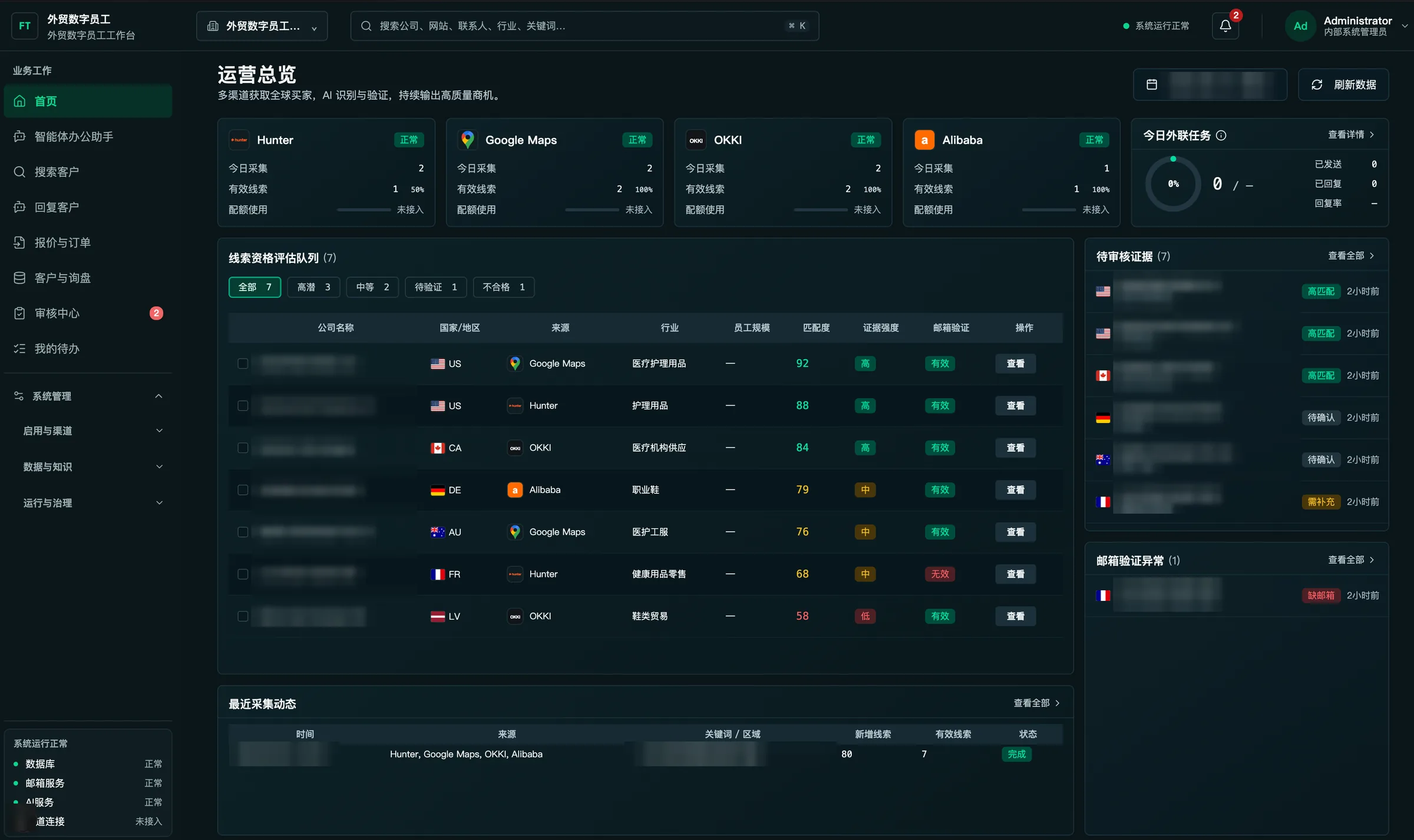
  • 搜索客户从 Hunter、Google Maps、OKKI、Alibaba 等渠道找客户,补全线索信息,再按匹配度、证据强弱和邮箱验证结果评估线索。
  • 自动回复起草询盘回复,引用产品资料。涉及报价的,由人审批后才发出。
  • 外贸录单录入和整理订单。
  • 把关知识库有版本管理。线索证据要人审核,报价要人审批。
产品截图
CW 外贸数字员工后台的运营总览截图:顶部是 Hunter、Google Maps、OKKI、Alibaba 四个线索来源的采集数,中间是线索资格评估队列,右侧是待审核证据和邮箱验证异常。公司名和时间已打码。
CW 外贸数字员工后台(搭建中)· 运营总览。公司名和时间已打码。 点击看大图。
怎么用
上线后这样用:搜索客户每天从各渠道采集线索,排进评估队列,销售看过证据再决定跟不跟;询盘进来,自动回复识别客户、产品和意图,起草回复,涉及报价的由销售改好、点通过才发出;成交后用外贸录单把订单录进去。
进展
CW 外贸数字员工智能体正在搭建,即将上线。目标是询盘回得更快、跟进有人落实。
插画:机房服务器机柜与一把锁,代表本地私有化部署

本地私有化算力方案

下面的内容摘自一份完整评估方案,包括硬件配置、软件架构、模型容量和三种业务包。硬件预算约 100–600 万,价格跟着行情走,不锁价;这只是硬件费用,安装、调试、压测和软件另外报价。合同按同时会话数和月度额度交付。

预约本地部署咨询

一份方案里写清楚的事

  • 硬件:选哪一档、几台机器、用什么显卡。硬件价格随市场波动,下单时询价
  • 软件:vLLM 推理、LiteLLM 网关、Open WebUI 对话界面、Qdrant / Milvus 向量库、ComfyUI 出图出视频、Prometheus / Grafana 监控
  • 容量:同时能开多少路会话、每月多少额度,都写进合同
  • 实施:安装、调试、压测和软件不含在硬件预算里,另外报价

三种业务包

业务包 A
文本助手
对话、摘要、写作、知识库。约 20 路同时使用;不含识图、生图和视频。
业务包 B
图文业务
在 A 的基础上增加图片理解、版面识别等图文能力。适合运营与办公场景。
业务包 C
创意视频
在 B 的基础上增加短视频生成(排队处理,标准档限时长和分辨率)。按条计额度。

三档硬件预算(行情参考,不含实施和软件)

入门单机≈100万档
1 台 RTX 5090 八卡机(大内存)。以文本为主,图文能力减半,视频为演示级。软件:vLLM + LiteLLM + Open WebUI + 向量库。
可商用分池≈200–300万档
多台 5090 八卡集群,可选 4090 视频专用机。文本、图文、视频分开部署,统一 API 网关与监控。
数据中心旗舰≈400–600万档
H100 / H200 级节点或混合部署,支持 70B 以上及中大型 MoE 模型。合同按同时会话数 + 月度额度计价。

部署原则:文本和视频不抢同一张卡的峰值。参考软件:vLLM / LiteLLM / Open WebUI / Qdrant·Milvus / ComfyUI / Prometheus·Grafana。硬件价格随市场波动,以下单时询价为准。三档预算都只是硬件费用,安装、调试、压测和软件另外报价。

Client work

Each case covers the problem, what we built, how the client uses it day to day, and where things stand now.

Illustration: three steps, a presentation board and a checklist, representing train, coach, hand over
TrainingBusiness teams / any industry

AI agent training and hands-on coaching

Challenge
The tools were bought and the courses attended, but the team still didn't know where to start, and after a few days everyone drifted back to the old way.
Approach
  • TrainRole-based, hands-on practice: hand a real task to an AI agent, spell out the requirements and limits, then check the result.
  • CoachWe pick one or two real business scenarios and run them together with the team, adjusting the approach as we go.
  • Hand overWhat works gets written up as process guides and templates the team can keep using on its own.
Day to day
An employee takes an everyday task, uses the template to set out requirements and limits, hands it to an AI agent, then reviews the result.
Outcome
The team now delegates routine work to AI on its own and knows how to check the output. Proven scenarios have a standard process that can be rolled out to more roles.
Illustration: a globe, message bubbles and parcels, representing export inquiries and orders
Project deliveryExport trade / B2B

CW online order handling for export trade

Challenge
Inquiries were scattered, follow-up depended on memory, and nobody could say where a quote or order stood. A chat-only assistant couldn't help close deals.
Approach
  • StructureFirst, get five kinds of information straight: customers, inquiries, products, orders and tasks.
  • Lead searchFind prospects on Hunter, Google Maps, OKKI, Alibaba and other channels, enrich the lead data, then score each lead by fit, strength of evidence and email verification.
  • Auto-replyDraft replies to inquiries, citing product documentation. Anything involving a price goes out only after a person approves it.
  • Order entryEnter and organize orders.
  • ControlsThe knowledge base is versioned. Lead evidence is reviewed by a person, and quotes need human approval.
Screenshot
Operations overview of the CW export-trade digital worker console: lead counts from Hunter, Google Maps, OKKI and Alibaba at the top, the lead qualification queue in the middle, and evidence awaiting review plus email verification issues on the right. Company names and times are blurred.
CW export-trade digital worker console (in progress), operations overview. Company names and times blurred. Click to enlarge.
Day to day
Once live: lead search collects leads from each channel daily and queues them for scoring, and sales reviews the evidence before deciding to pursue. When an inquiry arrives, auto-reply identifies the customer, product and intent and drafts a response; if it involves pricing, sales edits and approves it before it's sent. After a deal closes, the order goes in through order entry.
Status
The CW digital worker is being built and will launch soon. The goal: faster replies to inquiries, and every follow-up has an owner.
Illustration: server racks and a padlock, representing private on-prem deployment

Private on-prem compute plan

Excerpted from a full assessment we prepared: hardware configuration, software architecture, model capacity and three service packages. The hardware budget runs about RMB 1–6 million and tracks the market, so prices aren't locked. That figure covers hardware only; installation, tuning, load testing and software are quoted separately. The contract is delivered against concurrent sessions and monthly quota.

Talk to us about on-prem

What a proposal spells out

  • Hardware: which tier, how many machines, which GPUs. Hardware prices move with the market and are quoted at order time
  • Software: vLLM inference, LiteLLM gateway, Open WebUI chat interface, Qdrant / Milvus vector database, ComfyUI for images and video, Prometheus / Grafana monitoring
  • Capacity: concurrent sessions and monthly quota are written into the contract
  • Implementation: installation, tuning, load testing and software are not in the hardware budget and are quoted separately

Three service packages

Package A
Text assistant
Chat, summaries, writing, knowledge base. About 20 concurrent users; no image understanding, image generation or video.
Package B
Text + image
Everything in A, plus image understanding, layout recognition and other visual features. Suited to operations and office work.
Package C
Creative video
Everything in B, plus short video generation (queued; the standard tier caps length and resolution). Quota is counted per clip.

Three hardware budget tiers (market reference; excludes implementation and software)

Entry server≈ RMB 1M
One 8× RTX 5090 server with large memory. Mainly text; image capacity halved, video at demo level. Software: vLLM + LiteLLM + Open WebUI + vector DB.
Production pools≈ RMB 2–3M
A cluster of 8× 5090 servers, optional 4090 boxes for video. Text, image and video on separate pools behind one API gateway with monitoring.
Data-center flagship≈ RMB 4–6M
H100 / H200-class nodes or a hybrid setup, running 70B+ and mid-to-large MoE models. Contract priced on concurrent sessions + monthly quota.

Deployment rule: text and video never compete for the same GPU at peak. Reference stack: vLLM / LiteLLM / Open WebUI / Qdrant·Milvus / ComfyUI / Prometheus·Grafana. Hardware prices move with the market; the quote at order time applies. All three tiers are hardware-only budgets; installation, tuning, load testing and software are quoted separately.

自研产品与技术演示

这些是我们自己做的产品和演示,不是客户项目。

插画:圆润的桌面萌宠机器人
硬件产品

K宝

软硬一体的电子萌宠机器人

可以用在儿童陪学、老人陪聊和门店互动,外观和功能都能按 OEM 需求改。

查看详情 →
痛点
普通音箱只会听和说,没有感知和表情,也不会主动互动。儿童陪学、成人解压、老人陪聊、门店引流这些场景都很难用上。
方案
麦克风、摄像头、触摸传感器和 LED 表情装在一台机器里,能切换多个模型、自定义角色。外观和功能可以做 OEM 定制。

能做什么

  • 麦克风听对话,摄像头看人,触摸传感器感应抚摸,LED 屏做表情
  • 能切换多个模型,角色性格可以自己设定
  • 外观、功能都能按 OEM 需求定制
插画:展台上贴着 Layerory 标签的商品,背后是多张生成的主图画框
电商设计

ecom-image

电商 AI 出图工具(自研)

我们自己开发的出图工具。主图、详情页、海报一键生成,不同平台、不同语言的素材可以批量出。

查看详情 →
痛点
出海卖家做主图、详情页和海报都要靠美工,出图慢、成本高,还得照顾 Amazon、Temu、Shopee、TikTok 等平台的规范和不同语言的市场。
方案
前后端都是我们自己写的。一键生成主图、详情页和海报,支持多个平台和多种语言,生成后可以拖拽修改。

能做什么

  • 出什么:商品主图、详情页、海报
  • 按 Amazon、Temu、Shopee、TikTok 等平台出图,支持多种语言
  • 生成后可以直接拖拽修改
插画:视频剪辑工作台、麦克风和素材
视频创作

Outsider Studio

视频创作桌面软件

从创意到成片在一个软件里做完,项目和素材能反复用。

查看详情 →
痛点
选题、脚本、分镜、配音、素材、导出分散在多个网页工具里,项目很难复用。
方案
macOS / Windows 桌面软件,从选题到导出在同一个流程里做,自带素材库和设备授权,模型会持续升级。

能做什么

  • 流程:选题、脚本、分镜、配音、导出,在一个软件里接着做
  • 自带素材库,图片、音频、视频可以导入、分类
  • macOS 12 以上(Apple Silicon)和 Windows 10 以上(x64)
  • 不需要独立显卡,模型走在线接口,使用时要联网
查看产品页 →
实时 3D 渲染演示截图:白色机器人站在暗色反光大厅中
技术演示

实时 3D 渲染演示

WebGL / three.js 实时渲染

这是浏览器里的实时渲染,不是视频。画面里有程序化建模的机器人、镜面反射、体积光和电影感调色。

打开实时 3D 演示 →

Our products and demos

Things we built ourselves. These are our own products, not client projects.

Illustration: a rounded desktop companion robot
Hardware

K-Bao

An AI companion robot, hardware and software built together

Fits kids' learning companions, elderly companionship and in-store engagement. Look and features can be customized for OEM orders.

Details →
Problem
Smart speakers only listen and talk. They can't sense anything, have no expressions and never start an interaction, which rules them out for kids' learning, stress relief, elderly companionship or in-store engagement.
What it does
Microphone, camera, touch sensors and an LED face in one device. It can switch between models and take on custom personas. Design and features are available for OEM customization.

Features

  • Microphone for conversation, camera to see people, touch sensors to feel petting, LED screen for expressions
  • Switches between models; you define the character's personality
  • Design and features customizable for OEM
Illustration: a product tagged Layerory on a display stand, with several generated image frames behind it
E-commerce

ecom-image

AI product-image tool for e-commerce (in-house)

Our own image tool. Main images, detail pages and posters in one click, batch-produced for different platforms and languages.

Details →
Problem
Cross-border sellers rely on designers for main images, detail pages and posters. It's slow and expensive, and every platform (Amazon, Temu, Shopee, TikTok) and every language market has its own rules.
What it does
Front end and back end written in-house. Generates main images, detail pages and posters in one click, for multiple platforms and languages, with drag-and-drop editing afterwards.

Features

  • Outputs: product main images, detail pages, posters
  • Follows Amazon, Temu, Shopee, TikTok and other platform specs, in multiple languages
  • Edit results directly with drag and drop
Illustration: a video editing desk, microphone and assets
Video

Outsider Studio

Desktop app for video creation

From idea to finished video in one app, with projects and assets you can reuse.

Details →
Problem
Topic, script, storyboard, voiceover, assets and export are spread across separate web tools, so projects are hard to reuse.
What it does
A macOS / Windows desktop app that takes you from topic to export in one flow, with a built-in asset library and device licensing. Models keep getting upgraded.

Features

  • Flow: topic, script, storyboard, voiceover and export, all in one app
  • Built-in library for importing and organizing images, audio and video
  • macOS 12+ (Apple Silicon) and Windows 10+ (x64)
  • No dedicated GPU needed; models run through online APIs, so an internet connection is required
Product page →
Screenshot of the real-time 3D demo: a white robot standing in a dark, reflective hall
Tech demo

Real-time 3D rendering demo

WebGL / three.js real-time rendering

Rendered live in your browser, not a video: a procedurally modeled robot, mirror reflections, volumetric light and cinematic color grading.

Open the live 3D demo →

关于 Layerory

一个团队负责到底,不用对接好几家

业务应用、流程自动化、本地算力和私有化部署,我们一起做。只接企业客户(B2B),按结果验收。

从头到尾是同一个团队,出了问题不会几家互相推。可以先在云上试,再决定要不要私有化,云和本地之间能随时切换。接口统一,以后加场景不用换底座。

适合想快速上线的成长型团队、要求可控可审计的中大型企业、数据不能出境的行业,以及已有 GPU 想把机器用起来的团队。

Layerory 团队在厦门。

合作方式

四步上线

每一步写了我们做什么、你们能拿到什么。

01AI 企业方案落地咨询
看清场景、数据、合规要求和现有系统,判断是否必须用本地算力。
我们给出
先做哪个场景、放云上还是本地;已有 GPU 的,一起看能不能用上
02试点
先做一个高价值场景,7–15 天做出可演示、可试用的版本。
你们拿到
一个能演示、能试用的版本,可以先在云上跑
验收
按需求对齐时定好的范围和标准验收
之后
看过效果,再决定放云上还是本地、要不要推到别的场景
03部署
云端或本地都行。需要私有化时,按单机、集群或离线方案进场。
方式
云端,或本地单机 / 一体机、机房 GPU 集群、内网离线
硬件
本地硬件价格随行情变动,下单时询价,不锁价;安装、调试、压测和软件另外报价
04铺开
开权限、做培训、定运营指标,再复制到第二、第三个场景。
你们拿到
账号权限、使用培训、用量统计和安全审计
维护
上线后我们维护、接着改;本地部署能看到 GPU 占用、调用量、失败率和响应时间

核心成员

商业落地、工程交付、技术研究各有人管。下面是公开履历,不放私人联系方式。

Paul

Team Brain Commercialization Lead Enterprise Transformation Cognitive Architect

电商操盘 7 年商业化落地

做了七年电商操盘,熟悉流量、转化和增长,近一年完成了数字化落地转型。现在负责把客户的商业目标拆成具体项目,定好范围、交付节奏和验收标准。

  • 操盘电商时管流量获取、转化路径、活动玩法和增长复盘
  • 商业化落地项目里负责拆场景、划立项边界、排交付节奏和验收结果
  • 帮企业转型时,先讲清为什么做、先做哪件事、效果怎么衡量
  • 当过通信兵,在北京陆军通信基地做无线电和网络维护;大专学历,看重实战

Allen

Full-Stack Engineering Agentic RL

RMIT 博士在读前 Dell 工程师

做了六年 Python 后端、三年 React 前端,从开发到上线的交付和 CI/CD 都熟。现在在 RMIT 读计算机博士,研究大模型和强化学习的结合(Agentic RL),想做能扩展、真用得上的业务系统。

  • 在 Dell Technologies(上海)当过软件工程师,做硬件平台前端、服务器管理接口和大模型助手
  • 在墨尔本 9epoch 做过数据工程师,负责金融数据的清洗、采集和 AWS 部署
  • 常用 Python、React / Next.js、PyTorch,也做云原生和 DevOps
  • 研究可解释强化学习和多智能体博弈搜索,以第一作者发表过多篇论文,其中有 AAAI 2025 研讨会论文;墨尔本大学计算机硕士

Lumis

Application Full-Stack Frontend Lead

开发 3 年广州

偏前端的全栈工程师,熟悉 React / Vue / TypeScript。从产品流程、前端实现、模型和工作流接入、授权后台到部署发布,一个人能做完。

  • 一直在迭代 Outsider Studio,做过脚本、分镜、生图、TTS、导出、多模型路由和 License / OTA
  • 开源了 lingma-proxy,一个兼容通义灵码的代理,接了飞书和主流客户端协议
  • 参与过企业 AI 应用平台 GotoAI(整合 13+ 功能模块),也做过中国移动的营销活动页和内部提效工具
  • 常用 React 19、Tauri / Wails、Dify / RAGFlow / n8n、Node.js 和 Docker

About Layerory

One team, start to finish. No juggling vendors.

Business apps, workflow automation, on-prem compute and private deployment: we do all of it together. We work with businesses only (B2B), and you sign off on results.

It's the same team from day one to go-live, so there's no finger-pointing between vendors when something breaks. Try it in the cloud, then decide whether to go private; you can move between cloud and on-prem at any time. One unified API means new use cases don't require a new platform.

A good fit for growing teams that want to move fast, larger enterprises that need control and audit trails, industries where data can't leave the country, and teams that already own GPUs and want to put them to work.

The Layerory team is based in Xiamen, China.

How we engage

Live in four steps

What we do at each step, and what you get.

01AI implementation assessment
We look at your use cases, data, compliance requirements and existing systems, and decide whether on-prem compute is actually necessary.
You get
Which use case to start with and whether it goes in the cloud or on-prem; if you already own GPUs, we check whether they can be used
02Pilot
One high-value use case first, with a version you can demo and try in 7–15 days.
You get
A working version you can demo and try, which can run in the cloud to start
Sign-off
Against the scope and criteria agreed when we aligned on requirements
Then
Once you've seen results, decide on cloud vs on-prem and whether to expand to other use cases
03Deploy
Cloud or on-prem. For private deployment, we go on site with a single-server, cluster or air-gapped setup.
Options
Cloud, or on-prem server / appliance, data-center GPU cluster, air-gapped
Hardware
On-prem hardware prices follow the market and are quoted at order time, not locked; installation, tuning, load testing and software are quoted separately
04Scale out
Set up access, train users, agree on metrics, then repeat for the second and third use case.
You get
Accounts and permissions, user training, usage reporting and security audit logs
Support
We maintain and keep improving it after launch; on-prem you can see GPU utilization, call volume, failure rate and response time

Core team

Commercial delivery, engineering and research each have an owner. Public backgrounds only; no personal contact details.

Paul

Team Brain Commercialization Lead Enterprise Transformation Cognitive Architect

7 yrs running e-commerceCommercialization

Spent seven years running e-commerce operations, with a deep feel for traffic, conversion and growth, and over the past year led a digital transformation end to end. Today he turns a client's business goals into concrete projects, with clear scope, delivery cadence and acceptance criteria.

  • In e-commerce, owned traffic acquisition, conversion funnels, campaign mechanics and growth reviews
  • On commercialization projects, breaks down use cases, draws project boundaries, sets delivery cadence and signs off results
  • When helping companies transform, starts with why, what to do first and how to measure it
  • Former army signals specialist, maintaining radio and network systems at a communications base in Beijing; values hands-on experience over credentials

Allen

Full-Stack Engineering Agentic RL

PhD candidate, RMITEx-Dell engineer

Six years of Python back end and three of React front end, comfortable with everything from development to release and CI/CD. Now a computer science PhD candidate at RMIT researching how large language models and reinforcement learning fit together (agentic RL), with a focus on business systems that scale and actually get used.

  • Software engineer at Dell Technologies (Shanghai): hardware platform front end, server management APIs and an LLM assistant
  • Data engineer at 9epoch in Melbourne: cleaning and collecting financial data, deploying on AWS
  • Works daily with Python, React / Next.js and PyTorch, plus cloud-native and DevOps
  • Research in explainable RL and multi-agent game search, with several first-author papers including an AAAI 2025 workshop paper; MSc in Computer Science, University of Melbourne

Lumis

Application Full-Stack Frontend Lead

3 yrs devGuangzhou

A front-end-leaning full-stack engineer fluent in React / Vue / TypeScript. Can take a product alone from user flow and UI through model and workflow integration, licensing back end and release.

  • Continuously building Outsider Studio: scripting, storyboards, image generation, TTS, export, multi-model routing and license / OTA updates
  • Open-sourced lingma-proxy, a Tongyi Lingma-compatible proxy that connects Feishu and the major client protocols
  • Worked on GotoAI, an enterprise AI platform with 13+ modules, plus China Mobile campaign pages and internal productivity tools
  • Daily stack: React 19, Tauri / Wails, Dify / RAGFlow / n8n, Node.js and Docker

常见问题

数据会不会出内网?

可以不出。要私有化的话,系统装在你们自己的机房,有三种形态:一台单机或一体机、机房 GPU 集群、完全断网的内网离线版。离线版用安装包交付,模型、知识库和日志都留在内网,断网也能用。

和直接买现成的 SaaS 有什么不同?

我们按你们的业务场景来做,用的是你们自己的资料和流程,做完按结果验收。应用、知识库、算力和运维都是同一个团队负责,出了问题找我们就行。可以先用云端试,效果对了再把同一套东西搬到你们机房,业务不用重做。接口统一,方便接你们现有的系统。

试点要多久?做出来是什么?

先挑一个最值得做的场景,7–15 天做出能演示、能试用的版本,可以先在云上跑。交付范围和验收标准在开始前就定好。看过效果,再决定放云上还是本地、要不要推到别的场景。

AI 企业方案落地咨询做什么?

这是合作的第一步。我们一起看场景、数据、合规要求和现有系统,已有 GPU 的也一起看,然后给出先做哪个场景、放云上还是本地,判断是否必须用本地算力。之后再进入 7–15 天的试点。

怎么收费?

云端按用量或按席位收费。本地部署有三档硬件预算参考:入门单机约 100 万(一台 RTX 5090 八卡机),可商用分池约 200–300 万(多台 5090 八卡集群),数据中心旗舰约 400–600 万(H100 / H200 级节点)。这些是行情参考,不锁价,硬件以下单时的询价为准。这三档只是硬件费用,安装、调试、压测和软件不含在内,另外报价。合同里会写明同时会话数和月度额度。

本地部署最低要什么配置?

最低一档是一台 RTX 5090 八卡机(大内存),硬件预算约 100 万档,行情参考;安装、调试、压测和软件另外报价。这一档以文本为主:对话、摘要、写作和知识库都能跑,图文能力减半,视频只到演示级。软件用 vLLM、LiteLLM、Open WebUI 和向量库。要更高并发、做图文和视频,就上多机集群或 H100 / H200 节点。

我们已经有 GPU,能用上吗?

已有 GPU、想把机器用起来的团队,也在我们的服务范围里。在 AI 企业方案落地咨询阶段,先看你们现有的机器和系统,再定方案。部署后多张卡统一调度,对内只开一个接口,主流开源和商用模型都能接。

放云端还是放本地,怎么选?

看效果、成本和合规要求。想先快点看到效果,用云端,开通就能用。小团队、门店、科室想做私有化试点,用一台单机或一体机;并发高、要稳定推理,用机房 GPU 集群;政企、金融、制造、医疗这类数据敏感的行业,或者不能联网的等保、涉密环境,做内网离线。也可以先在云上跑,效果确认后整体搬到本地,业务不用重做。

哪些事交给 AI,哪些留给人?

AI 负责识别、查资料和起草:比如识别询盘里的客户、产品和意图,对上产品资料,写好回复草稿,并注明引用了哪份资料。报价这类高风险操作,要人审批后才发出。知识库有版本记录,每条回答都标出处,事后查得到。

上线以后谁来维护?

还是我们。账号权限、用量统计、安全审计和培训都在交付范围里,上线后接着改。本地部署的话,GPU 占用、调用量、失败率和响应时间都能看到。

什么情况不适合找我们?

个人项目我们不接,只做企业客户。如果只想要一个演示用的聊天机器人,也不用找我们。我们的做法是先把一个真实业务场景跑通,再按结果验收。

FAQ

Does our data have to leave our network?

No. For private deployment the system is installed in your own data center, in one of three forms: a single server or appliance, a GPU cluster, or a fully air-gapped offline build. The offline build ships as an installer; models, knowledge base and logs stay on your network and everything works without an internet connection.

How is this different from buying off-the-shelf SaaS?

We build around your use case, with your own documents and processes, and you sign off on results. Apps, knowledge base, compute and operations are all handled by one team, so there's one place to go when something goes wrong. You can start in the cloud and, once it works, move the exact same system into your data center without rebuilding. A unified API makes it easy to connect to the systems you already run.

How long does a pilot take, and what do we get?

We pick the use case most worth doing and deliver a version you can demo and try within 7–15 days, which can run in the cloud to start. Scope and acceptance criteria are agreed before work begins. After you've seen results, you decide on cloud vs on-prem and whether to expand.

What happens in the AI implementation assessment?

It's the first step. Together we look at your use cases, data, compliance requirements and existing systems, including any GPUs you already own. We then recommend which use case to start with, whether it belongs in the cloud or on-prem, and whether on-prem compute is really needed. A 7–15 day pilot follows.

How is it priced?

Cloud is billed by usage or by seat. For on-prem there are three hardware budget references: an entry server at about RMB 1M (one 8× RTX 5090 machine), production pools at about RMB 2–3M (a cluster of 8× 5090 servers), and a data-center flagship at about RMB 4–6M (H100 / H200-class nodes). These are market references, not fixed prices; hardware is quoted at order time. All three figures are hardware only. Installation, tuning, load testing and software are not included and are quoted separately. The contract states concurrent sessions and monthly quota.

What's the minimum on-prem setup?

The entry tier is one 8× RTX 5090 server with large memory, with a hardware budget of around RMB 1M (market reference; installation, tuning, load testing and software are quoted separately). It's mainly for text: chat, summaries, writing and knowledge base all run well, image capacity is halved, and video is demo-level only. The software stack is vLLM, LiteLLM, Open WebUI and a vector database. For higher concurrency, images and video, you move up to a multi-node cluster or H100 / H200 nodes.

We already have GPUs. Can we use them?

Yes. Teams that already own GPUs and want to put them to work are part of what we do. During the assessment we review your current machines and systems before settling on a plan. After deployment, all GPUs are scheduled as one pool behind a single internal API, and mainstream open-source and commercial models can be plugged in.

Cloud or on-prem: how do we choose?

It comes down to results, cost and compliance. To see results quickly, start in the cloud. For a small team, branch or department piloting private deployment, use a single server or appliance. For high concurrency and production inference, use a GPU cluster in your data center. Data-sensitive sectors such as government, finance, manufacturing and healthcare, or regulated environments with no internet access, go air-gapped. You can also start in the cloud and move the whole system on-prem once it's proven, without rebuilding.

What does the AI handle, and what stays with people?

AI identifies, looks things up and drafts: for example, it reads an inquiry, works out the customer, product and intent, matches the right product docs and writes a draft reply noting which documents it used. High-risk actions like sending a quote need human approval first. The knowledge base is versioned and every answer cites its source, so everything can be traced afterwards.

Who maintains it after launch?

We do. Access control, usage reporting, security audit logs and training are part of the delivery, and we keep improving it after launch. On-prem, you can see GPU utilization, call volume, failure rate and response time.

When are we not the right fit?

We don't take personal projects; we work with businesses only. If all you need is a chatbot for a demo, you don't need us either. Our approach is to get one real business workflow working first and be judged on the results.

预约方案演示

说说你们的行业、最想先解决的问题,以及算力想放云上还是本地。我们会回复场景建议、部署方式和相近案例。

01

需求对齐

梳理场景和流程,定好交付范围与验收标准。
02

方案演示

演示云端版本,讲清本地部署怎么装。
03

落地交付

按定好的范围上线,数据可以不出内网。

电话

13063055187

工作日尽快回复

邮箱

947129811@qq.commuy08629@gmail.com

商务与方案咨询

Book a demo

Tell us your industry, the problem you most want to solve first, and whether compute should live in the cloud or on-prem. We'll come back with a suggested use case, deployment options and similar work we've done.

01

Align on needs

Map the use case and the process; agree on scope and acceptance criteria.
02

See a demo

We demo the cloud version and walk through how on-prem installation works.
03

Deliver

Go live within the agreed scope, with data kept on your network if needed.

Phone

+86 130 6305 5187

Weekdays, China time (UTC+8)

Email

947129811@qq.commuy08629@gmail.com

Business and solution inquiries